
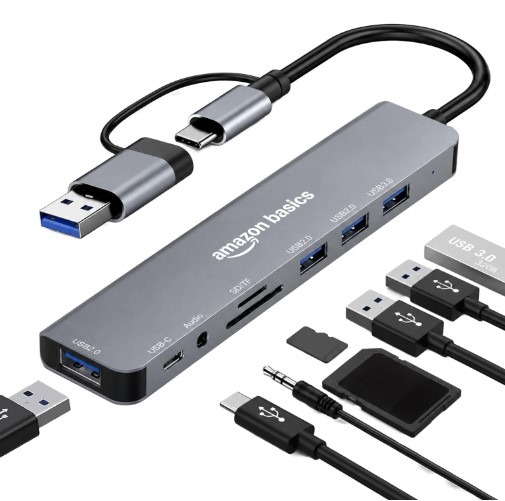
Amazon Basics 8-in-1 USB Hub : Introduction
Modern laptops are getting slimmer, but many now come with fewer ports. This can become frustrating when you need to connect a USB drive, mouse, keyboard, memory card or wired headphones at the same time.
The Amazon Basics 8-in-1 USB Hub aims to make everyday computer use more convenient by bringing several connections into one compact accessory. Depending on the exact version, it offers USB-A and USB-C connectivity, USB data ports, SD and TF card readers, and a 3.5mm audio jack. Always confirm the port layout on the product page before buying, because Amazon Basics sells different USB hub models.
But is this USB hub worth buying? Will it work with your laptop, and is it suitable for office work, studying or transferring files?
In this Amazon Basics 8-in-1 USB Hub review, we’ll explore seven important things to know before purchasing. We’ll cover its design, ports, compatibility, everyday uses, advantages and limitations to help you decide whether it suits your needs.
Table of Contents
1. Amazon Basics 8-in-1 USB Hub: Quick Overview
A USB hub is a small accessory that lets you connect multiple USB devices through a compatible computer port. It’s especially useful when your laptop doesn’t have enough connections for all your accessories.
The Amazon Basics 8-in-1 USB Hub is designed for people who want to connect everyday devices without constantly unplugging one accessory to use another.
For example, you might want to use a mouse, access files from a USB drive and transfer photographs from a memory card. A suitable hub can make these tasks easier by keeping the connections together.
Key Features at a Glance
| Feature | What to know |
|---|---|
| Product type | Multiport USB hub |
| Connector options | Check the exact dual-plug version |
| USB connectivity | USB 3.0 and USB 2.0 ports, according to the listed model |
| Memory card support | SD and TF card readers |
| Audio connection | 3.5mm audio jack |
| Cable length | Listed version advertises an 18 cm cable |
| Main purpose | Connecting compatible accessories and transferring files |
| Price | Check the current Amazon India listing |
The listed model is advertised with one USB 3.0 port, three USB 2.0 ports, a USB-C 2.1 port, SD/TF card readers and a 3.5mm audio jack. Check the listing carefully to confirm that these specifications match the exact item you plan to purchase.
What Comes with the USB Hub?
Before buying, check the product photos and see what comes in the box. These should help you confirm whether the hub includes a permanently attached cable, the type of connectors supplied and any additional accessories.
Don’t assume that a USB hub includes a separate charging adapter, HDMI cable or other accessories unless the seller clearly states so.
This quick check can help you avoid buying the wrong product.
2. Amazon Basics 8-in-1 USB Hub: Design and Build Quality
A USB hub should be easy to use and carry. Before buying, check its size and cable length to make sure it suits your needs.
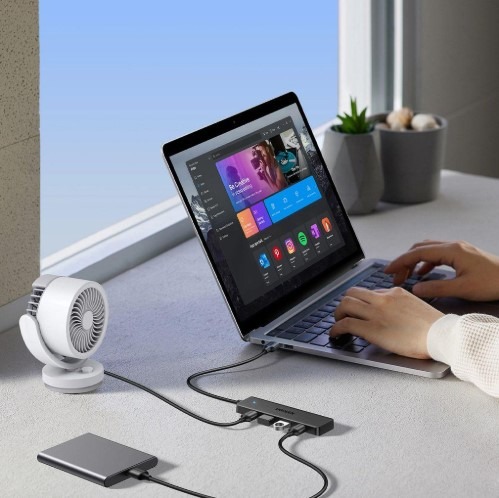
The Amazon Basics 8-in-1 USB Hub brings several connections together in one compact device. Instead of carrying separate adapters, you can use one hub to connect compatible devices such as USB drives, memory cards, and other accessories.
Is It Good for Everyday Use?
If you work from home, attend online classes, or use a laptop regularly, a USB hub can make your work easier.
You can connect devices such as a mouse, keyboard, or USB drive without having to unplug other accessories all the time.
Think about where you’ll use the USB hub. If you’ll use it mainly at your desk, make sure the cable is long enough and the ports are easy to reach. If you travel often, choose a small, lightweight hub that’s easy to carry.
Is It Easy to Carry While Travelling?
A compact USB hub is handy when you work in a café, office, library, or hotel. You can keep it in your laptop bag and use it whenever you need extra ports.
The advertised cable length is 18 cm for the listed version, so check whether that length will suit your desk arrangement. A short cable can keep the setup tidy, but it may not reach comfortably if your laptop ports are in an awkward position.
Buying tip: Look closely at the product images and dimensions before ordering. They can help you decide whether the hub will fit your workspace.
3. Ports and Connectivity Options
Before buying a USB hub, check which ports it has and whether they suit your needs. Even if a product is called an “8-in-1” hub, make sure it has the connections you actually need.
The listed Amazon Basics model combines USB connections with memory card readers and an audio jack. Here’s what the main connections are generally used for.
USB-A and USB-C Connectors
USB-A is the familiar rectangular connector used by many keyboards, mice, flash drives and other accessories. USB-C is a smaller, reversible connector found on many modern laptops, tablets and phones.
Having the right connector can make a hub more convenient, but connector shape alone doesn’t guarantee compatibility.
For example, a USB-C port on a laptop may support data transfer without supporting video output. Similarly, a phone may need to support USB host or OTG functionality to use certain accessories.
Before buying, check the hub’s connector arrangement and confirm that it matches your device.
USB 3.0 and USB 2.0 Ports
USB 3.0 is designed for faster data transfer than USB 2.0. This can be useful when copying large files, photos, videos or documents.
USB 2.0 is generally suitable for accessories such as keyboards, mice and other devices that don’t need high data speeds.
If the hub has both types of ports, you can choose the connection that makes the most sense for each accessory.
Remember that the actual transfer speed depends on the hub, the computer’s port, the connected device and the file being transferred. A fast port cannot make a slow USB drive transfer data faster than it is designed to.
SD and TF Card Readers
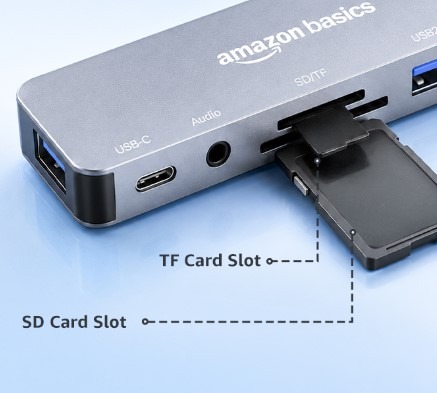
Memory card readers can be helpful for photographers, students and people who regularly move files between devices.
An SD card is commonly used in cameras, while a TF card is another name for a microSD card. With compatible cards, a built-in reader can save you from carrying a separate card reader.
You can use this type of connection to access photos, documents or other files stored on supported cards.
Before purchasing, check the card formats supported by the exact model. Also remember that the card reader’s presence doesn’t guarantee support for every memory card capacity or format.
3.5mm Audio Jack
A 3.5mm audio jack is useful if you have wired headphones, earphones or speakers with a compatible plug.
This can be convenient when your laptop doesn’t have a dedicated headphone socket or when you want to connect wired audio equipment through the hub.
However, audio functionality can depend on the hub’s design and the connected device. Check the product information if microphone support or headset controls are important to you.
4. Data Transfer Performance: What Should You Expect?
Data transfer performance matters if you regularly copy photographs, documents, videos or other large files.
The listed model has both USB 3.0 and USB 2.0 connections. USB 3.0 can reach speeds of up to 5 Gbps, while USB 2.0 can reach up to 480 Mbps under ideal conditions. Actual file transfer speeds may be lower depending on the devices you use.
What Affects Real-World Transfer Speeds?
Several things can affect how quickly your files transfer:
- The connected device: An older flash drive may be slower than a newer one.
- The computer’s USB port: must support the required USB standard to get the best possible speed.
- The file type: Many small files can take longer to transfer than a few large files.
- Connecting several devices : to the same hub can affect data transfer speeds because they share the available bandwidth
- The memory card: Card speed and condition can influence transfer times.
For example, transferring a large folder of photographs may take longer than copying a small document. That doesn’t necessarily mean the hub is faulty.
Is It Suitable for Large Files?
For occasional file transfers, documents and everyday accessories, a compatible hub with USB 3.0 can be a practical option.
If you regularly move large video files or work with high-speed external storage, check the port specifications carefully. You may prefer a hub with more high-speed data ports if the extra performance is important to your work.
Avoid choosing a product based only on the words “high speed.” Look for the exact USB standard and make sure the device you connect supports it.
5. Device Compatibility: Will It Work with Your Laptop?
Compatibility should be one of your first checks before purchasing any USB hub.
A hub can have the right connector but still fail to provide every feature you expect. The connected device must support the relevant functions, and the hub’s specifications must match your requirements.
Compatibility with Windows and Mac
Many standard USB accessories work with current Windows and macOS computers, but support depends on the hub and the connected devices.
Before ordering, check the manufacturer’s compatibility information for your operating system and computer model.
Also consider whether your laptop has a USB-A port, a USB-C port or both. If you use a MacBook or a slim Windows laptop with limited connections, the correct hub may help you connect additional peripherals.
Can You Use It with a Phone or Tablet?
Some phones and tablets can use USB accessories through a compatible USB-C or OTG connection. However, not every device supports every hub function.
For example, memory card access may work on one phone while a particular audio function may not work on another.
Check your phone or tablet’s USB host support, operating system requirements and the hub’s compatibility information before purchasing.
Does It Support External Monitors?
Don’t assume that every eight-in-one USB hub supports an external monitor. The version discussed here is described with USB data ports, card readers and an audio jack, not necessarily HDMI or DisplayPort.
If you need to connect a monitor, choose a model that explicitly lists the video output you require. Your computer must also support video output through the relevant connection.
This is an important point because two USB hubs can both be called “8-in-1” while offering completely different features.
6. Everyday Uses: Who Can Benefit from This USB Hub?
A multiport hub can be useful in different situations, depending on the connections it provides and the devices you own.
For Office Work and Online Classes
If you work or study on a laptop, you may use a mouse, keyboard, USB drive and other accessories throughout the day.
A suitable hub can make these connections easier to manage. It can also reduce the need to unplug and reconnect devices whenever you switch tasks.
For students, this can be helpful when accessing files, preparing assignments or using a wired mouse during online classes.
If you also need a charging accessory for your smartphone, read our review of the Samsung 25W Charging Adapter to learn more about its features.
For Photographers and Content Creators
If your camera stores photographs on an SD card, a compatible card reader can make file access easier.
You may be able to copy photographs to your computer without connecting the camera itself. This can save time when organising pictures or preparing content.
However, if you transfer large amounts of high-resolution video regularly, check the card reader’s supported formats and the speed of the relevant USB connection.
For Home and Travel Use
A USB hub can also help with everyday tasks at home. You might connect a keyboard and mouse, access a flash drive or use wired head phones with a compatible device.
When travelling, a single hub can be easier tocarrythan several individual adapters.
Make a list of the devices you use most often. This will help you check whether the USB hub has all the ports you need.
Looking for a portable charging solution? Check out our Xiaomi Power Bank 4i 10000mAh review to learn about its capacity and charging features.
7. Pros and Cons of the Amazon Basics 8-in-1 USB Hub
Every accessory has strengths and limitations. The right choice depends on your requirements, the price and whether the available ports match your devices.
Pros
- Multiple connection options: A suitable model can bring several everyday connections together.
- Memory card access: Built-in SD and TF readers can reduce the need for a separate card reader.
- Wired audio connectivity: The advertised 3.5mm jack may be useful for compatible headphones or speakers.
- Useful for everyday tasks: USB hubs can help connect common computer accessories.
- Compact accessory format: A small hub can be convenient for desk use or travel.
Cons and Things to Check
- Port layouts can differ: Amazon Basics offers different multiport hubs, so check the exact version.
- Not every USB port is equally fast: USB 2.0 and USB 3.0 have different maximum data rates.
- Compatibility isn’t universal: Your laptop, phone or tablet must support the features you want to use.
- Video Output: If you want to connect an external monitor, check whether the USB hub supports HDMI or DisplayPort.
- Charging features may be limited: Don’t assume that a hub can charge your laptop or deliver fast charging without explicit specifications.
Is It the Right Choice for You?
This hub may suit you if your main goal is to connect everyday accessories and access compatible memory cards.
On the other hand, if you need multiple high-speed USB ports, wired Ethernet, an external monitor connection or laptop power delivery, compare it with a hub that explicitly supports those features.
A little checking before you buy can help you avoid paying for the wrong product.
Amazon Basics 8-in-1 USB Hub: Price and Value for Money
The value of a USB hub depends on its current price, build quality, supported connections and how often you’ll use it.
A budget-friendly hub can be a sensible purchase if it provides the ports you need. Paying extra for a docking station with HDMI, Ethernet or power delivery may not be worthwhile if you never use those features.
At the same time, choosing the cheapest model isn’t always the best decision. A hub that lacks the correct connector or transfer speed may not meet your needs.
How to Check the Latest Price
Product prices and offers can change, so check the current Amazon India listing before making a decision.
Compare the following details:
- The exact product name and model.
- The number and type of ports.
- Supported USB data speeds.
- Memory card and audio compatibility.
- Return policy and warranty information, where applicable.
- Current price and available offers.
Alternatives: What Should You Compare Before Buying?
If this model doesn’t provide everything you need, consider comparing it with other USB hubs.
A basic USB hub may be enough to connect a keyboard, mouse, and USB drive. If you want to connect an external monitor, look for a hub with HDMI support. For a complete desk setup, a docking station with Ethernet and laptop charging support may be a better choice.
When comparing products, look beyond the number in the product title. An eight-in-one hub doesn’t automatically offer more useful features than a seven-in-one model.
Before buying, check the available ports, data transfer speeds, device compatibility, charging features, and warranty. Choose a hub that works with your devices and fits your budget.
For a general explanation of USB technology and its standards, visit the official USB Implementers Forum website.
Frequently Asked Questions
1. Is the Amazon Basics 8-in-1 USB Hub worth buying?
It may be worth considering if you need extra USB connections, memory card access and a compatible audio connection. Before buying, confirm that the exact model has all the ports you need.
2. Does the Amazon Basics 8-in-1 USB Hub support fast data transfer?
The listed version includes a USB 3.0 connection, which supports a higher theoretical data rate than USB 2.0. Actual speeds depend on the hub, computer, connected device and files being transferred.
3. Can I connect multiple devices at once?
A USB hub lets you connect several compatible devices at once. However, the number of ports and available power determine which devices you can use together. Check the product details before connecting devices that need more power.
4. Is it compatible with MacBooks and Windows laptops?
Compatibility depends on your laptop’s ports, operating system and the exact hub model. Check the product listing and your computer’s specifications before purchasing.
5. Does this USB hub support HDMI?
Don’t assume it does. The model discussed here is advertised with USB ports, SD/TF card readers and a 3.5mm audio jack. If you need HDMI, choose a product whose listing clearly confirms HDMI output.
6. Can It Charge a Laptop or Phone?
Do not assume that it supports laptop charging or fast phone charging. Check whether the exact model explicitly supports power delivery or charging output and confirm the supported wattage.
7. Can I use the SD and TF card readers together?
Check the manufacturer’s product details to confirm how the card readers work. If you need to access two cards at the same time, make sure the listing or manual confirms simultaneous use.
8. What should I check before buying a USB hub?
Check the connector type, number of ports, USB standards, card reader support, audio features, operating system compatibility and any charging or video requirements. These details matter more than the product’s advertised port count alone.
Final Verdict: Should You Buy the Amazon Basics8-in-1USB Hub?
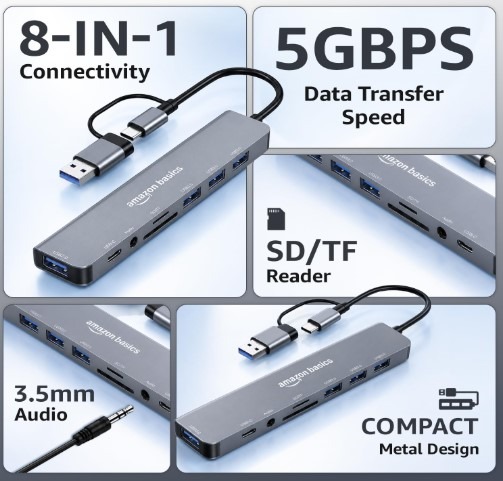
The Amazon Basics 8-in-1 USB Hub is worth considering if you’re looking for a convenient way to connect compatible everyday accessories and access memory cards through a single hub.
Its combination of USB connections, card readers and a 3.5mm audio jack may be useful for students, office workers and people who regularly use laptops or other compatible devices.
However, check the exact model before ordering. Make sure it has the ports you need, supports your device and offers the data speeds required for your work. If you need HDMI, Ethernet or laptop charging, compare it with a model that specifically lists those features.
My Recommendation: If the USB hub has all the ports you need and is within your budget, it could be a good choice. Before buying, make sure the USB hub has the features you need.